Hands-on From Docker to Azure: Secure AI Development
We’ll start by running a small AI workload locally. This will give us a baseline and help us understand the limitations of running directly on a developer machine.
Then we’ll run the same workload inside a container. This step shows how containers improve reproducibility and provide a controlled execution environment without changing the application itself.
After that, we’ll execute the workload inside a sandbox environment. This is particularly important when dealing with AI-generated code or agent-driven workflows, where isolation becomes essential for protecting the host system.
Finally, I’ll show how the same containerized workload can be moved to Azure. The key idea here is consistency: the application we run locally is the same one that runs in the cloud.
The goal of this demo is not to focus on complex code, but to understand the workflow and the architecture that allow us to build AI systems safely and reliably.
Goals
This demo is about process and architecture, not model complexity.
Before we start the live demonstration, I want to be very clear about its purpose.
The goal of this demo is not to build a complex AI application or to dive deep into code. Instead, it’s to show how we can execute AI workloads safely and consistently as we move from experimentation to production.
First, we’ll demonstrate safe execution of AI workloads by running them in controlled environments, reducing the risk of unintended side effects on the host system.
Second, we’ll focus on reproducible environments. The same workload should behave the same way regardless of where it runs, whether that’s on a local machine or in the cloud.
Third, we’ll highlight container portability. The container image we build locally is the same artifact we deploy later, without modification.
Finally, we’ll show how these technical choices support responsible AI practices by enabling better isolation, governance, and operational control throughout the lifecycle.
Running Locally
Before we look at containers or sandbox environments, let’s start with how most experiments are actually performed today.
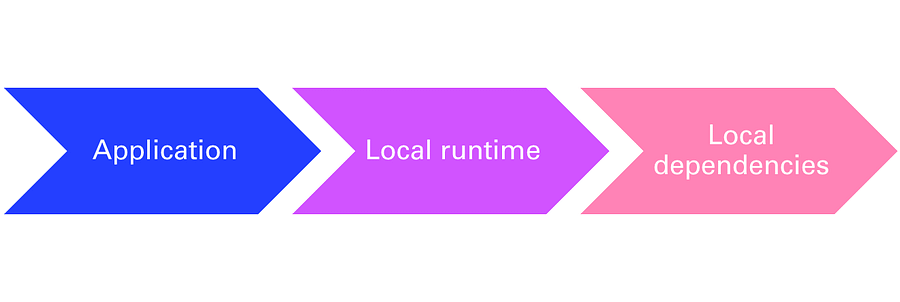
Typically, a developer runs an application directly on their machine. The application uses the local runtime, the local libraries, and whatever dependencies are installed in that environment.
This approach works well at the beginning because it is fast and convenient. It allows us to prototype quickly and test ideas without much setup.
However, over time, this model introduces several challenges.
One of them is environment drift. As we install packages and update libraries, our environment slowly changes, and it becomes difficult to reproduce the same results later or on another machine.
Another issue is dependency management. We often install libraries temporarily, and it becomes unclear which versions are actually required for the application to work correctly.
There is also a security aspect to consider. When running scripts locally — especially code generated by AI — we may be executing code that interacts with files, network resources, or credentials on our machine.
So, running locally is useful and often necessary, but it is not always reliable or safe in the long term.
Let’s start by running our example locally, and then we’ll see how we can improve this execution model step by step.
Step 1: Local Execution of a Student Analytics Assistant
For this demonstration, I wanted a simple and realistic scenario that everyone can understand quickly.
The example we will use is a small analytics assistant that analyzes student performance data.
The dataset contains information such as student names, subjects, scores, and study time.
The application reads this data and generates a few insights, like calculating averages and identifying students who may need additional support.
This is intentionally a very simple application. The goal of the demo is not to build a complex AI model, but to illustrate the development workflow and the execution environment.
We start by running this application locally, which is how most experiments begin. Developers typically install dependencies, run scripts, and test ideas directly on their machines.
This works well at the beginning, but as experiments grow and AI-generated code becomes more common, this approach starts to introduce risks and limitations.
So let’s first run the application locally and observe the result, and then we’ll look at how we can improve this workflow.
Running in a Container
In the previous step, we ran the application locally and saw that it worked, but we also discussed the limitations of running directly on a developer machine.
The next step is to improve this execution model by running the same application inside a container.
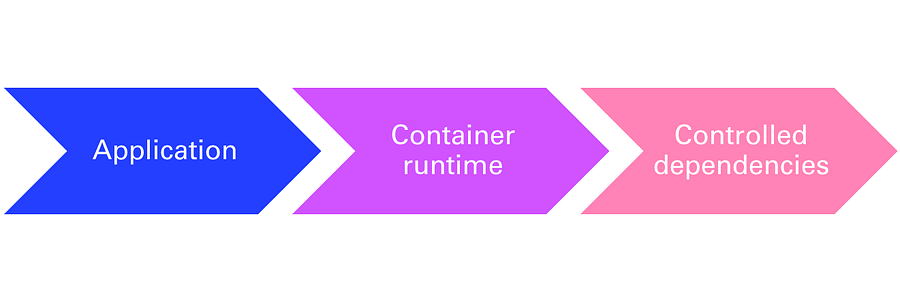
Instead of relying on whatever happens to be installed on the local machine, we define a controlled runtime that includes the exact dependencies the application needs. This environment is packaged together with the application, so it can be reproduced consistently anywhere.
Running in a container gives us three key benefits.
First, reproducibility. Anyone can run the container and get the same result, regardless of their local setup.
Second, isolation. The application runs in its own environment, reducing the risk of conflicts or unintended interactions with the host system.
And third, portability. The same container can run on another developer’s machine, in a test environment, or in the cloud without modification.
Let’s now see how we can take our existing application and package it into a container by adding a Dockerfile and building our first image.
Docker provides a command called docker init, which analyzes the project and generates the configuration needed to containerize the application.
This allows us to go from a local application to a containerized workload in just a few steps.
Let’s start by running docker init and see what it generates for us.
Now that the application is running, let’s take a moment to see what actually happened behind the scenes.
I’ll open Docker Desktop to show you the artifacts that were created.
Here we can see the image that was built. The image contains everything needed to run the application: the runtime, dependencies, and the application itself.
And here we can see the container, which is the running instance created from that image.
This distinction is important:
The image is the blueprint, and the container is the running process.
This is what gives us reproducibility. Anyone can take the same image and run the same container on another machine or in the cloud, and get the same behavior.
Running in a Sandbox
So far, we’ve seen how to run an application locally and then how to run the same application inside a container.
Containers already give us reproducibility and a level of isolation, which is a big improvement over running directly on a developer machine.
But when we work with AI systems, especially agents or code generated by AI, we often need an additional level of protection.
In these situations, we may be executing code that we did not write ourselves, or code that interacts with files, tools, or external services. That introduces new risks, even if the application is containerized.
This is where sandbox environments become important.
A sandbox allows us to execute workloads in a temporary and controlled environment that can be created and destroyed easily. It provides stronger isolation and reduces the impact of unexpected behavior.
In other words, we can experiment freely while protecting the host system and keeping the environment clean.
Let’s now run this application inside a sandbox environment and observe how this execution model works in practice.
Docker Sandbox
•Docker Sandbox provides an isolated development and execution environment designed to safely run code, tools, and workloads without affecting the host system.
•It is especially useful for:
•AI-generated code
•Experimental scripts
•Agent-driven workflows
•Dependency-heavy workloads
A sandbox behaves like a temporary development machine where you can install tools, run containers, and test code safely.
Before we run anything, I copied the project to another directory called After. Next, I want to confirm the sandbox capability is available in this Docker Desktop installation. The key point is: we’re about to run the workload in an isolated environment separate from my host machine.
I’m creating a sandbox VM bound to this workspace folder.
I will use this command line to create a sandbox for your workspace
Think of it as a disposable, isolated development environment. If anything, weird happens — dependency mess, file changes, unexpected commands — I can destroy the whole sandbox and return to a clean state.
We will use docker sandbox ls to check if our sandbox is created or not
Next step consist on Opening an interactive shell inside the sandbox using this command line: docker sandbox run claude
If you want to execute agents using Claude, this is a great solution. As you can see here, it requires a subscription. In our example, we will just run our code inside the sandbox; it’s not an AI agent.
To go inside the sandbox using this command line. docker sandbox exec -it student-sbx bash
Now I’m inside the sandbox. This is not my host OS. This is the isolation boundary. From here, I can run experiments more safely — especially when code is AI-generated or not fully trusted.
So your sandbox is ready as a new environment to use to test your project.
Transition to Cloud
Up to now, we have been running everything locally — first directly on the machine, and then inside containers.
One of the biggest advantages of containers is portability. The container image we built locally is not tied to this machine. It is a self-contained package that can run anywhere a container runtime is available.
Moving to the cloud is therefore a straightforward process. First, we build the container image, which we have already done. Then we push that image to a container registry so it becomes accessible from the cloud environment. Finally, we deploy that same image to a managed service such as Azure Container Apps.
The key point here is that we are not modifying the application. We are not changing dependencies or configuration. The same container image moves from local development to the cloud unchanged.
This consistency is what makes containers such a powerful foundation for modern AI and cloud-native applications.
Azure Architecture
Let’s look briefly at how this solution is structured in the cloud.
At the center, we have Azure Container Apps. This is the service that runs our containerized application. It provides a managed runtime, so we don’t need to manage virtual machines or orchestrators ourselves.
The container image is stored in Azure Container Registry, which acts as a secure repository for our images. This allows us to version, store, and deploy containers in a controlled way.
If the application needs AI capabilities, it can connect to Azure OpenAI or other AI services. This allows us to integrate language models or other AI features without embedding models directly into the container.
Finally, Log Analytics provides monitoring and observability. It collects logs and metrics so we can understand how the application behaves in production and troubleshoot issues when necessary.
The key benefits of this architecture are managed scaling, secure networking, and built-in observability, which allow teams to focus on the application rather than the infrastructure.
Responsible AI Development
When we talk about responsible AI, we often think about ethics and governance, but there is also a very practical dimension that concerns architecture and operations.
In this context, I like to think of responsible AI development as resting on four pillars.
The first is isolation. We need to ensure that workloads, especially experimental or AI-generated code, run in controlled environments so that failures or unexpected behavior do not impact other systems.
The second pillar is identity. Applications should access services securely using managed identities or secure credentials, rather than hardcoded keys. This reduces security risks and improves traceability.
The third pillar is observability. We need visibility into logs, metrics, and execution behavior to understand how systems operate and to detect issues early.
And finally, cost awareness. AI workloads can scale quickly and consume significant resources, so monitoring usage and controlling costs must be part of the design from the beginning.
Responsible AI is therefore not only an ethical topic — it is also technical, operational, and financial. It is about building systems that are safe, reliable, and sustainable in real environments.
Let me close by summarizing the journey we followed today.
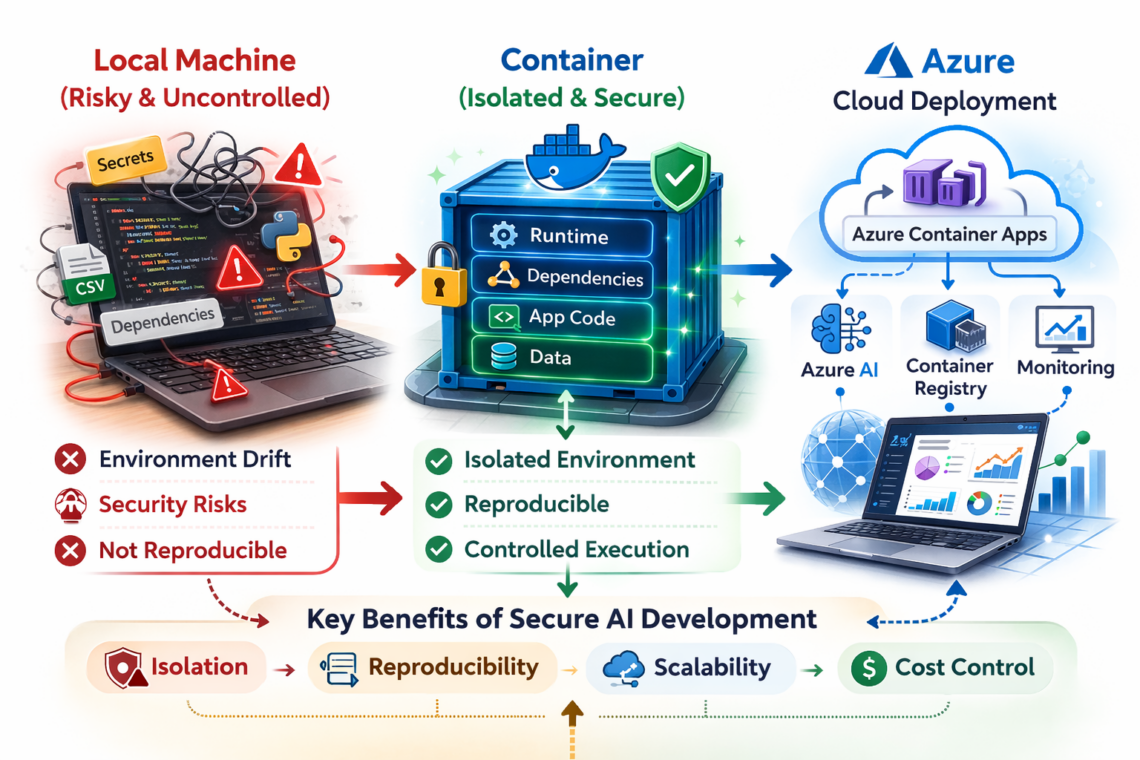
On the left, we start with the typical local development environment. It’s fast and convenient, but it often becomes risky and difficult to control. Dependencies change, environments drift, and running AI-generated code can introduce security risks.
In the middle, we introduced containers. Containers give us isolation, reproducibility, and controlled execution. The application, its dependencies, and its runtime are packaged together, creating a consistent and reliable environment.
On the right, we moved that same container to the cloud. Using services like Azure Container Apps, we gain scalability, monitoring, and secure integration with AI services — without changing the application itself.
So the key message of this session is that secure AI development is not about slowing down experimentation. It’s about creating a reliable path from local experimentation to production by using isolation, reproducibility, and controlled execution as fundamental principles.

